October 24, 2026 · Dennis Miguel
Social Media Audit Checklist (2026): 15 Checks for Small Businesses
A step-by-step social media audit checklist with 2026 engagement benchmarks, so you know what to keep, what to stop and what to fix first.
Most small businesses post on social media every week without ever checking whether it works. A social media audit fixes that. It takes about an hour, and it tells you what to keep, what to stop, and what to fix first. This social media audit checklist walks you through it step by step, with 2026 benchmarks so you know what “good” actually looks like.
Key takeaways
- Audit every account once a quarter. It takes about an hour per platform.
- A good Instagram engagement rate for a business is above 1%. The average brand sits around 0.4% to 0.5%.
- Your profile, bio and link do more work than any single post. Fix them first.
- Consistency beats volume: a steady 3 posts a week usually outperforms bursts of daily posting followed by silence.
- Track one business result (calls, bookings, sales), not just likes.
Before you start
Open a spreadsheet with one row per account (Instagram, Facebook, TikTok, LinkedIn, YouTube) and these columns: followers, posts in the last 90 days, average engagement rate, best post, worst post, and link clicks. Pull the last 90 days from each platform’s built-in insights. That’s enough data to spot patterns without drowning in it.
1. Profile and bio
People decide in a few seconds whether to follow, click or leave. Check each account for:
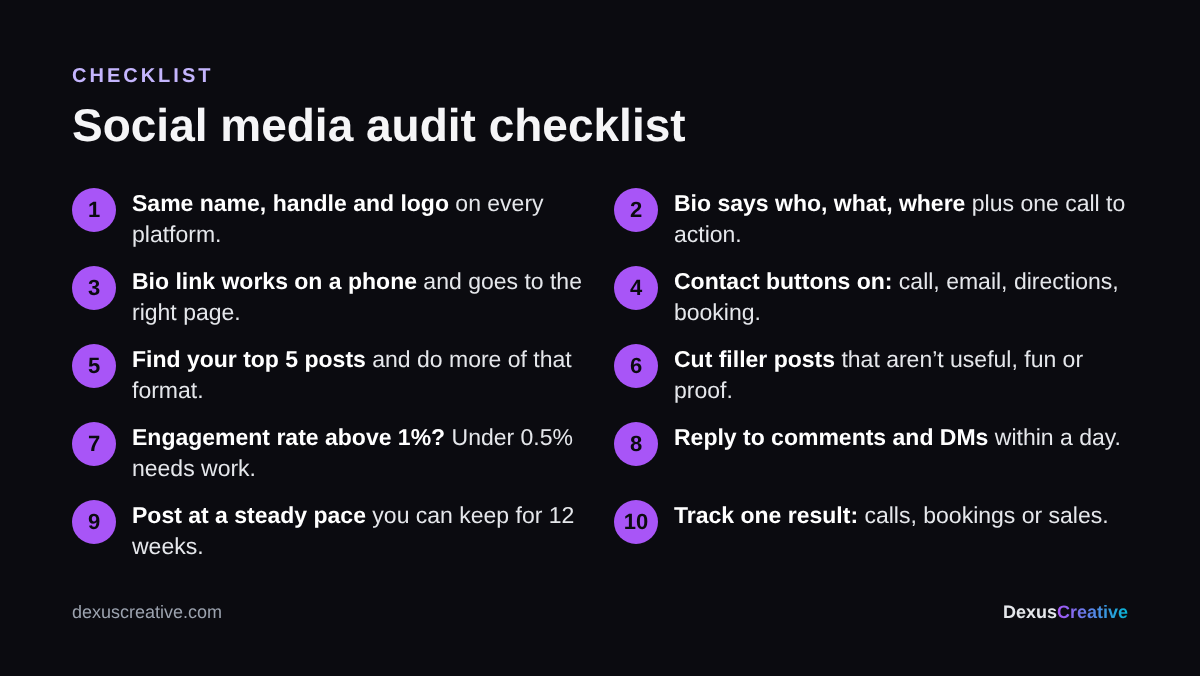
- Same name, handle and logo everywhere. If you’re @dexuscreative on Instagram, don’t be @dexus_sd on TikTok. Consistency makes you easier to find and easier for AI assistants to match.
- A bio that says who you help, what you do and where. “Family dentist in Encinitas. Same-week appointments.” beats a clever slogan.
- One clear call to action and a working link. Click it from your phone. Does it go to a page built for social visitors, or your homepage?
- Contact options turned on: phone, email, directions and booking buttons where the platform offers them.
- Business account settings: the right category, hours and location filled in.
2. Content
Sort your last 90 days of posts by engagement and look at the top and bottom five.
- Which formats win? Compare Reels or short videos, carousels and single images. Do more of whatever is clearly ahead.
- Which topics win? Behind the scenes, before-and-after, tips and customer stories usually beat announcements and stock graphics.
- Is it on brand? Same colors, fonts and voice across posts, so people recognize you before they see your name.
- Is every post useful, entertaining or proof? If a post is none of those, it’s filler. Cut it.
3. Engagement: how you compare
Engagement rate is likes, comments, shares and saves divided by followers, as a percentage. Work it out for your average post.
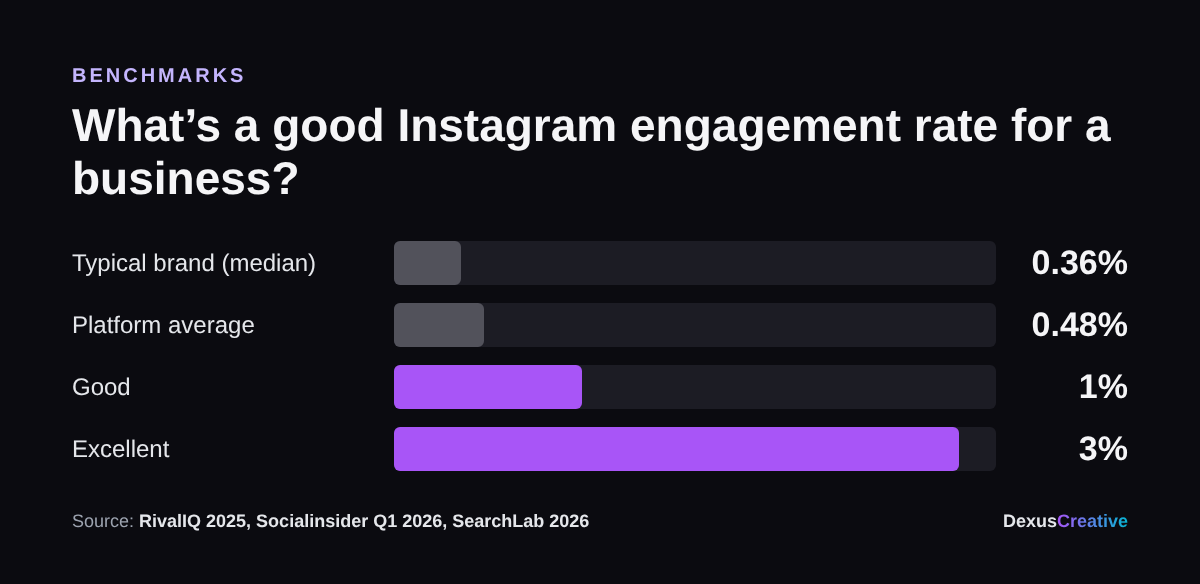
- Below 0.5%: below average for a business account. Content or targeting needs work.
- 0.5% to 1%: average. Normal for most brands, but there’s room to grow.
- Above 1%: good. Above 3% is excellent.
Also check whether you reply to comments and DMs within a day. Replies count as activity, and an unanswered question in your comments is a lost customer.
4. Timing and consistency
- How often did you actually post? Count posts per week for each of the last 12 weeks. Big gaps hurt reach more than a lower but steady pace.
- When do you post? Sprout Social’s 2026 analysis of about 2 billion engagements found weekday midday to afternoon, especially Tuesday through Thursday, works best across industries, and weekends are weakest. Your own data matters more, so compare your best posts’ days and times.
- Do you have a simple plan? A one-page monthly calendar keeps you posting when things get busy.
5. Results
- Link clicks and profile visits from each platform’s insights.
- Website visits from social in Google Analytics. Add UTM tags to your bio link so you can see them.
- Calls, bookings, quotes or sales you can trace to social. Even a “How did you hear about us?” question at checkout counts.
- Cost per result if you run ads: what you spent divided by leads or sales.
What to do after your audit
- Fix your profiles and links today. It takes 20 minutes and helps every future post.
- Pick your best-performing format and topic, and double them for the next month.
- Set a posting pace you can actually keep, and schedule two weeks ahead.
- Choose one result to track every month.
- Run the audit again in 90 days and compare.
Related reading
For a related checklist, see how to get your business recommended by AI, which covers the listings and reviews that AI assistants read.
About Dexus Creative
Dexus Creative is a San Diego marketing agency for local businesses with high-value customers, like dental practices, med spas, roofers and other home services. We’re a small team that does the whole job in-house, so you deal with one partner instead of a videographer, an ads freelancer and an SEO vendor who never talk to each other.
- Short-form video, shot and edited by us. We film at your business, so every ad and post shows your real team and your real work.
- Paid ads on Meta, Google and TikTok. We use that video as ad creative and test it fast.
- Local SEO and AI visibility. Google Business Profile, reviews, service pages, and the listings ChatGPT and Gemini read when they recommend businesses.
- Landing pages and tracking built for each campaign, so every lead is counted.
How we work: we test with a small budget, measure cost per lead and per new customer, and only scale what pays for itself. You get a clear report every month. We also offer a retainer-plus-equity model for growth-stage businesses, so we win when you do.
Results we’ve published: 40% year-over-year growth for Excelarace, a first product run that sold out in under two months for BoBlocks, and 900+ pre-launch users for CareTabs.
Want to see where you stand first? Run the Free Local SEO Audit or the LLM Visibility Audit. Both are free. Or get in touch with Dexus Creative to talk through your goals.
Sources
- Socialinsider, Instagram benchmarks, Q1 2026 (platform-wide average engagement rate 0.48%)
- RivalIQ, 2025 Social Media Industry Benchmark Report (brand median 0.36%)
- SearchLab, 2026 engagement guidance (above 1% good, above 3% excellent)
- Sprout Social, Best times to post on Instagram in 2026 (about 2 billion engagements across about 307,000 profiles)
Frequently Asked Questions
List every account, pull the last 90 days of insights, then check five areas: profile and bio, content performance, engagement rate versus benchmarks, posting consistency and timing, and business results like link clicks, calls and sales. Fix profiles first, then double down on your best formats.
Above 1% is good and above 3% is excellent. The typical brand sits around 0.4% to 0.5% (Socialinsider Q1 2026 average 0.48%; RivalIQ 2025 brand median 0.36%).
Once a quarter is enough for most small businesses. Compare each audit with the last one to see what changed.
Across industries, weekday midday to afternoon, especially Tuesday through Thursday, performs best and weekends are weakest, according to Sprout Social's 2026 data. Your own best posts are the better guide, so check when they went out.