October 26, 2026 · Dennis Miguel
Google Business Profile Optimization Checklist (2026)
Every Google Business Profile setting that matters in 2026, in the order to do them, plus what customers expect from your reviews.
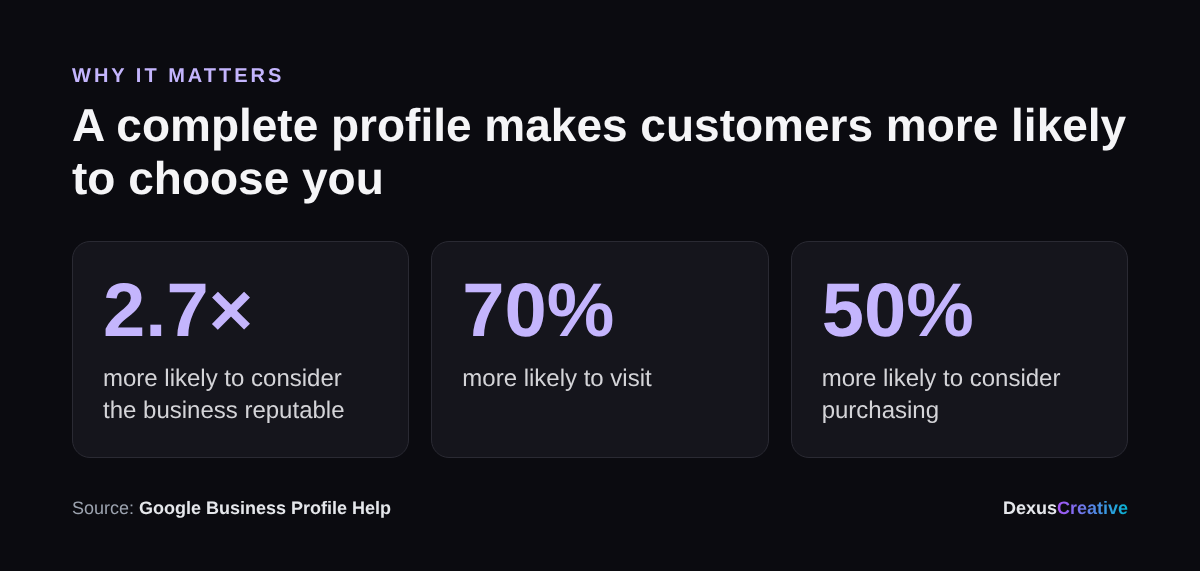
Your Google Business Profile is often the first thing a customer sees: before your website, before your social, and increasingly before AI assistants recommend you. Google says people are 2.7 times more likely to see a business as reputable when its profile is complete. This Google Business Profile optimization checklist covers every setting that matters in 2026, in the order to do them.
Key takeaways
- Complete profiles win: Google says customers are 70% more likely to visit and 50% more likely to consider buying from a business with a complete profile.
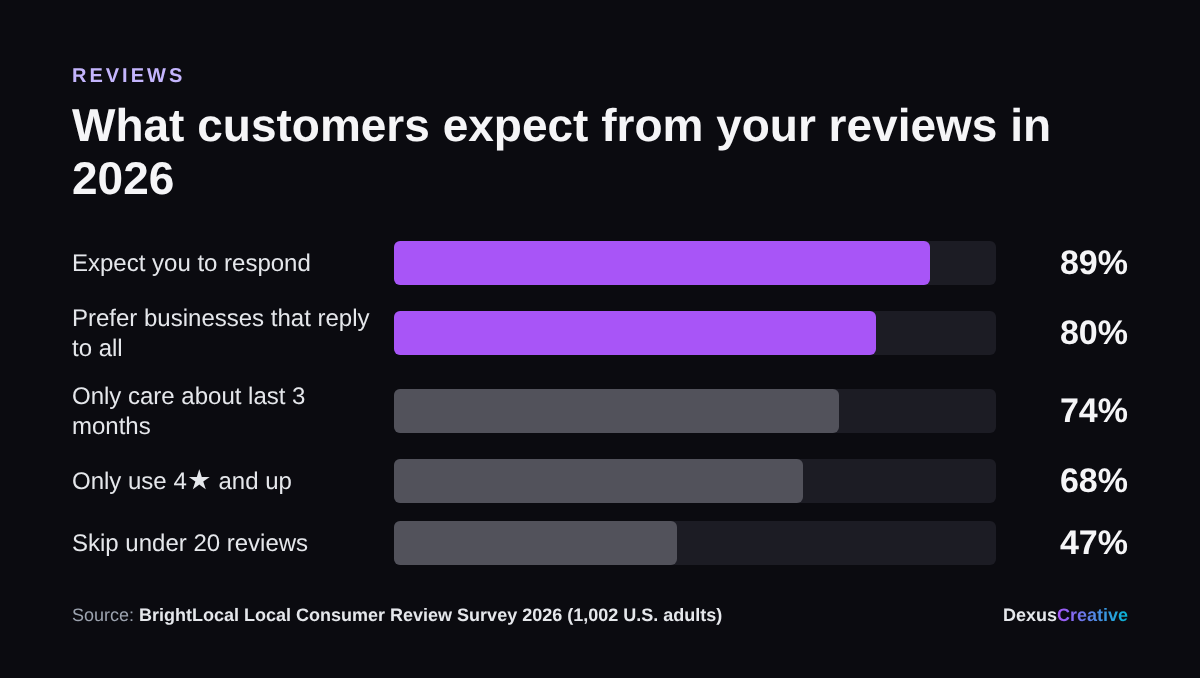
- Reviews decide the click. 68% of consumers only use businesses rated 4 stars or higher, and 47% skip businesses with fewer than 20 reviews.
- Recency matters: 74% of consumers only care about reviews from the last three months.
- Reply to every review, ideally within a day. 80% of consumers are more likely to use a business that responds to all reviews.
- Keep your details identical on Google, Bing, Apple Maps, Yelp and your website.
Why a complete profile matters
1. The basics
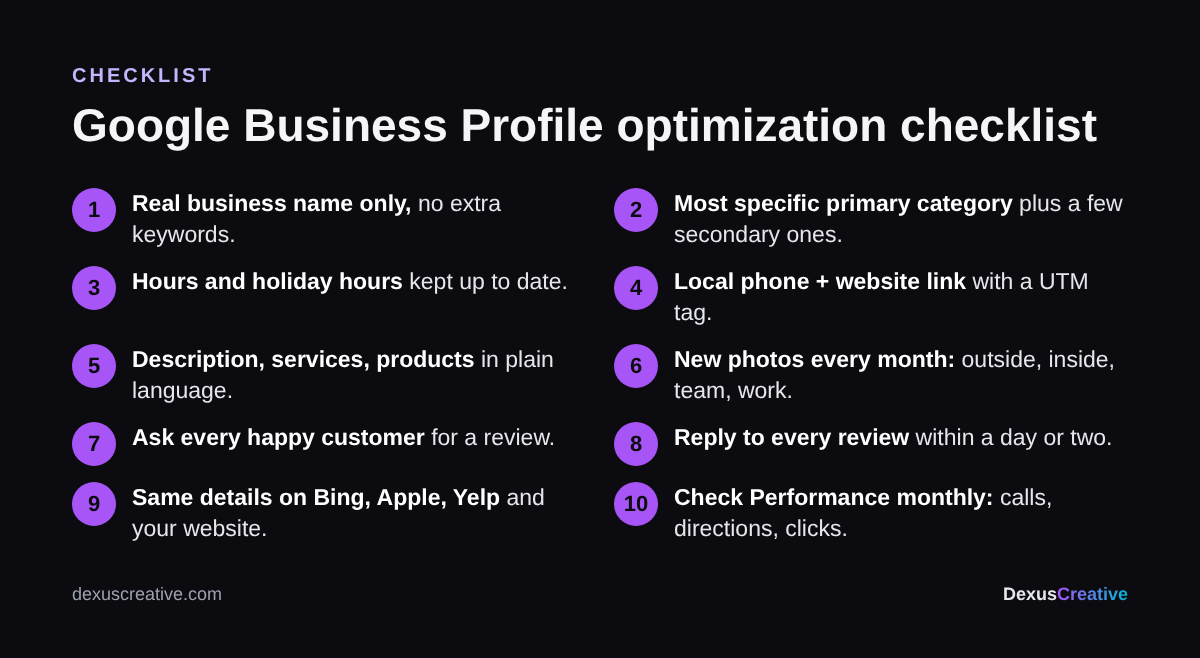
- Business name: your real name only, exactly as it appears on your signage. Adding keywords (“Smile Dental Best Dentist Encinitas”) breaks Google’s guidelines and can get your profile suspended.
- Primary category: the most specific one that fits (“Pediatric dentist,” not just “Dentist”). This is one of the biggest factors in which searches you show up for. Add a few secondary categories for other services.
- Address or service area: show your address if customers visit you. If you go to them, hide it and list the cities you serve.
- Hours: regular hours, plus holiday hours before every holiday. Wrong holiday hours are one of the fastest ways to earn a 1-star review.
- Phone number: a local number that’s answered. Use the same one everywhere.
- Website link: point it to your homepage or a location page, with a UTM tag (for example ?utm_source=google&utm_medium=gbp) so you can see that traffic in Google Analytics.
- Opening date and attributes (wheelchair accessible, free Wi-Fi, women-owned, online appointments and so on).
2. Content
- Business description: up to 750 characters. Say what you do, who you serve and where, in plain language. Put the most important information in the first sentence or two, since that’s what shows before “More.”
- Services and products: list each one with a short description and price where it makes sense. These show up when people search for that specific service.
- Photos: logo, cover photo, exterior (so people recognize the building), interior, team and your work. Google says adding photos regularly can help your ranking. Aim for new photos every month.
- Posts: share an offer, event or update every week or two. It shows the profile is active.
- Booking or quote link if you take appointments.
3. Reviews
Reviews are where most customers make up their minds. BrightLocal’s 2026 survey of 1,002 U.S. consumers found 97% read reviews for local businesses.
- Ask every happy customer. Copy your review link from the profile and send it by text or email right after the job. Never offer discounts or gifts for reviews: that breaks Google’s rules.
- Keep them coming. A steady few each month beats a burst once a year, because people weigh recent reviews most.
- Reply to all of them, good and bad, within a day or two. Make each reply personal: 50% of consumers are put off by templated responses.
- Handle bad reviews calmly. Thank them, take it offline (“Please call me at…”), and fix the issue if it’s real. Future customers read how you respond.
4. Consistency across the web
- Make your name, address and phone number identical on Google, Bing Places, Apple Business Connect, Yelp, Facebook and the directories in your industry.
- Put the same details in your website footer, with local business schema markup.
- Find and remove duplicate or old listings (old address, old phone number, a previous business name).
Consistency matters even more now that AI assistants recommend businesses. They pull from many of these sources at once, and conflicting details give them a reason to pick someone else. We cover that in How to Get Your Business Recommended by AI.
5. Tracking
- Open the profile’s Performance report once a month: searches, views, calls, direction requests and website clicks.
- Note which search terms people used to find you. Add services or description wording for the ones you want more of.
- Check where you rank around your area, not just at your office. Rankings change a lot a mile or two away.
Check your profile in a minute
Our Free Local SEO Audit checks your Google profile, compares your reviews with the top local competitors, and shows your Google Maps rank at 25 points around your business. It’s free, and you don’t need to sign up to see your score.
About Dexus Creative
Dexus Creative is a San Diego marketing agency for local businesses with high-value customers, like dental practices, med spas, roofers and other home services. We’re a small team that does the whole job in-house, so you deal with one partner instead of a videographer, an ads freelancer and an SEO vendor who never talk to each other.
- Short-form video, shot and edited by us. We film at your business, so every ad and post shows your real team and your real work.
- Paid ads on Meta, Google and TikTok. We use that video as ad creative and test it fast.
- Local SEO and AI visibility. Google Business Profile, reviews, service pages, and the listings ChatGPT and Gemini read when they recommend businesses.
- Landing pages and tracking built for each campaign, so every lead is counted.
How we work: we test with a small budget, measure cost per lead and per new customer, and only scale what pays for itself. You get a clear report every month. We also offer a retainer-plus-equity model for growth-stage businesses, so we win when you do.
Results we’ve published: 40% year-over-year growth for Excelarace, a first product run that sold out in under two months for BoBlocks, and 900+ pre-launch users for CareTabs.
Questions about your profile? Get in touch with Dexus Creative.
Sources
- Google, Tips to improve your Business Profile
- BrightLocal, Local Consumer Review Survey 2026 (1,002 U.S. adults)
Frequently Asked Questions
Use your real business name, choose the most specific primary category, set accurate hours including holidays, add services, photos and a clear description, post regularly, ask every happy customer for a review, reply to all reviews, and keep your details identical on Google, Bing, Apple Maps, Yelp and your website.
Yes. Google says customers are 2.7 times more likely to consider a business reputable, 70% more likely to visit and 50% more likely to consider purchasing when its profile is complete.
Enough to clear what customers look for: BrightLocal's 2026 survey found 47% of consumers won't use a business with fewer than 20 reviews, and 68% only use businesses rated 4 stars or higher. Recent reviews matter most, since 74% only care about the last three months.
Yes. 89% of consumers expect businesses to respond and 80% are more likely to use one that responds to all reviews. Keep replies personal; half of consumers are put off by templated responses.
No. Adding keywords that aren't part of your real business name breaks Google's guidelines and can get the profile suspended.